

The default Gravity Forms upload field isn’t built for control. Users drop in anything, and you’re left cleaning up oversized or tilted photos. That’s where a WordPress image editor built for Gravity Forms changes everything.
Instead of juggling external tools, these plugins bring live cropping, resizing, filters, and previews inside your forms. Visitors can fix their images before submission; you get cleaner uploads, smaller files, and faster pages.
If you run job portals, membership sites, or listings where visuals matter, this upgrade isn’t optional. It’s operational hygiene.
Here are the five best WordPress image editor plugins for Gravity Forms in 2025 that actually solve the upload chaos.
Why You Need a WordPress Image Editor Inside Gravity Forms
Every form looks clean until someone uploads a 15-megabyte photo straight from their phone. The default Gravity Forms upload field can’t crop, compress, or correct that image; it just accepts it.
That’s why using a WordPress image editor inside your forms makes such a difference.
A good WP image editor for Gravity Forms lets users adjust files before submission. They can crop to fit your layout, resize to your file limits, or rotate images into proper orientation; all without leaving the page. The result: faster load times, lighter storage, and submissions that look consistent across your site.
For site owners, WordPress image editor plugins also protect performance. Compressed images mean fewer bandwidth spikes, better Core Web Vitals, and improved SEO.
Whether you run a directory, event site, or user-generated marketplace, adding front-end image editing is one of the simplest upgrades that directly improves both user experience and backend efficiency.
Quick Summary
Each image editor plugin fills a specific role:
- Smart Uploads – the most complete all-in-one WP image editor for full control and creative adjustments.
- Image Hopper – ideal for lightweight, quick edits with reliable front-end performance.
- File Upload Pro – best suited for developers or teams needing strict upload validation.
- GP Media Library – made for editors who want every upload instantly accessible in the Media Library.
- Image Picker – perfect for visual choice fields, surveys, or gamified form experiences.
5 Gravity Forms-based WordPress Image Editor Plugins

Here are our top picks for WordPress image editor Gravity Forms addons:
Gravity Forms Smart Uploads by GravityMore

Gravity Forms Smart Uploads stands out as one of the most capable WordPress image editor plugins for this purpose.
Gravity Forms Smart Uploads is a premium Gravity Forms addon designed to make image handling in Gravity Forms more intelligent and user-friendly.
Instead of simply uploading files, users can crop, resize, rotate, and enhance images, even when using Gravity Forms booking plugins. It turns the basic upload field into a full WP image editor, cutting out the need for post-submission fixes.
Key Features
- Front-end image editor with live crop, rotate, and resize controls
- Built-in filters, annotations, shapes, and text tools
- Smart Gallery for multi-image uploads and reordering
- Adjustable quality, size, and aspect ratio controls
- Real-time image previews before submission
- Seamless integration with Gravity Forms payment gateways and Media Library workflows
Pros
- Intuitive user interface. Users edit without leaving the form
- Reduces oversized uploads and speeds up site performance
- Ideal for listings, membership sites, or any form needing photo input
- Adds professional polish to image-driven submissions
Cons
- Premium-only plugin (no free tier)
- May require tuning for large, high-traffic forms
- Advanced editing features might be overkill for basic upload needs
Pricing
Starts at $29.99/year for a single-site license, with tiered pricing for multi-site and lifetime options. Includes support and ongoing feature updates.
Image Hopper – Top Gravity Forms Addon

When it comes to seamless front-end image handling, Image Hopper brings a powerful balance of simplicity and control. It’s one of the most dependable WordPress image editor plugins for Gravity Forms
Image Hopper is an official Gravity Forms addon that replaces the default file upload field with a smarter, lightweight WP image editor.
It focuses on user efficiency, letting visitors crop, rotate, resize, or convert images before submission.
Key Features
- Live crop, rotate, and resize capabilities are built into Gravity Forms
- Automatic conversion from HEIC to JPEG or WebP
- Enforced aspect ratios for cleaner design consistency
- Simple drag-and-drop image uploads
- Automatic optimization for faster form submissions
- Reliable support from the official Gravity Forms ecosystem
Pros
- Fast, lightweight, and stable with no unnecessary bloat
- Perfect for maintaining visual consistency across user uploads
- Native integration ensures fewer compatibility issues
- Converts mobile image formats automatically (HEIC support is a big plus)
Cons
- Limited creative tools with no filters or annotations
- More focused on accuracy and optimization than design freedom
- Premium-only plugin
Pricing
Included in select Gravity Forms addon plans or available via partner bundle; pricing typically starts around $59/year, depending on license type.
Gravity Forms File Upload Pro
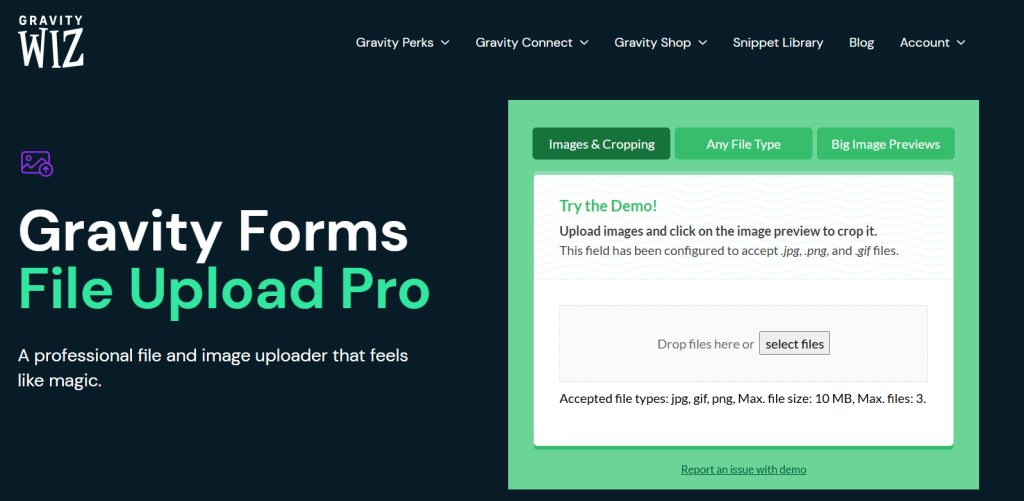
For site owners who want professional-grade image upload control without adding full design tools, Gravity Forms File Upload Pro is a standout choice. This plugin is offering one of the most precise WordPress image editor plugins for managing form-based submissions.
Developed by Gravity Wiz, File Upload Pro enhances the native Gravity Forms upload field with advanced validation, previews, and editing options.
It’s not a decorative WP image editor, but a performance-focused solution that gives users a controlled upload experience.
Key Features
- Live image previews inside the form
- Crop and zoom functionality with aspect ratio enforcement
- Drag-and-drop upload with multi-image support
- Real-time file validation for size and dimensions
- Automatic fallback for unsupported formats
- Integration with other Gravity Perks for extended workflows
Pros
- Professional interface that improves submission quality
- Keeps file sizes optimized without compromising resolution
- Excellent support from Gravity Wiz’s active development team
- Works seamlessly with high-traffic or business-critical forms
Cons
- Lacks advanced creative editing, like filters or text overlays
- Requires Gravity Perks license to access and manage updates
- Slight learning curve for first-time Gravity Wiz users
Pricing
Available through the Gravity Perks license, starting at $59/year for a single site or included in bundle tiers for multi-site users.
GP Media Library

Among the smarter WordPress image editor plugins for form-based workflows, GP Media Library by Gravity Wiz stands out for its seamless integration between user uploads and the native WordPress Media Library.
GP Media Library connects your Gravity Forms uploads directly to the WordPress image editor ecosystem, automatically saving form submissions as standard media files.
Each WordPress image inherits your defined metadata rules, ensuring every upload lands in the right place, properly titled, and ready for reuse or editing within the familiar WP image editor interface.
Key Features
- Direct synchronization with the WordPress Media Library
- Custom file naming and folder assignment for order and clarity
- Support for images, PDFs, videos, and other media types
- Integrates smoothly with File Upload Pro and other Gravity Perks
- Reduces manual work for content and marketing teams
Pros
- Keeps uploads fully centralized in one accessible media hub
- Enables consistent file handling across users and editors
- Extends Gravity Forms’ functionality without slowing down performance
- Ideal for sites with strict media management standards
Cons
- No in-form editing tools like cropping or rotation
- Requires an active Gravity Perks license
- It may be overkill for sites with minimal upload activity
Pricing
Part of the Gravity Perks bundle, starting at $59/year for single-site use, with higher tiers for developers and multi-site operations.
Image Picker for Gravity Forms

When it comes to turning static forms into interactive experiences, Image Picker for Gravity Forms offers a unique twist among WordPress image editor plugins.
Image Picker replaces traditional choice fields with a visual interface, allowing users to select from predefined images rather than text options.
While it’s not a WP image editor in the traditional sense, it complements the broader WordPress image editor ecosystem by giving site owners a design-driven way to collect preferences, ratings, or visual feedback directly within Gravity Forms.
Key Features
- Converts choice fields into image-based selectors
- Fully compatible with quizzes, surveys, and product configurators
- Customizable image sizes and selection styles
- Works alongside conditional logic and field rules
- Clean, responsive layout optimized for both desktop and mobile
Pros
- Elevates form design with visual interactivity
- Increases engagement and completion rates
- Simple setup with no coding required
- Lightweight and compatible with most Gravity Forms add-ons
Cons
- Doesn’t include editing tools like crop or rotate
- Dependent on image quality and sizing for clarity
- Limited to predefined choices
Pricing
Available as a premium Gravity Forms product addon from third-party developers, typically priced around $39.99/year for a single-site license.
Final Word on Best WordPress Image Editor Plugins
Integrating a WordPress image editor directly into Gravity Forms changes how your site handles uploads; from plain file collection to a refined, user-controlled process. Whether you’re managing customer submissions or visual feedback, the right WordPress image editor plugins can make your forms smarter and cleaner. If you are a newbie, start with Gravity Forms Smart Uploads for its all-around editing power. As your workflow grows, layer in Image Hopper or File Upload Pro for more specialized control. Together, they transform Gravity Forms from a data collector into a complete WordPress image editor workflow engine.